HoudiniLoggerAdapter
The HoudiniLoggerAdapter is a logging.LoggerAdapter
that provides a number of conveniences for Houdini.
The adapter can be instantiated directly while passing in an existing instance of logging.Logger or by using
the from_name() class method that will create
a logger of the supplied name and then instantiating the adapter using it.
The following two are equivalent:
>>> logger = logging.getLogger("demo")
>>> adapter = HoudiniLoggerAdapter(logger)
>>> adapter = HoudiniLoggerAdapter.from_name("demo")
The adapter specific keywords available at adapter creation time (direct object instantiation or using ) or at log emission time.
Node Path Output
The main feature of HoudiniLoggerAdapter is the ability to
specify a node which is associated with the message. This allows you to do things such as make log calls from inside
Python nodes that are cooking and have their path included as part of the message so that you’re able to see the
source of messages.
>>> adapter = HoudiniLoggerAdapter.from_name("demo")
>>> adapter.warning("This is a warning")
This is a warning
>>> adapter.warning("This is a warning", node=hou.node('/obj/geo1'))
/obj/geo1 - This is a warning
Here we can see that by passing a hou.Node as the node kwarg we get the log message containing that node’s
path.
Houdini UI Output
Severity Mapping
When outputting to Houdini UI tooling the log message severity is automatically remapped to the most appropriate
hou.severityType value:
Log Severity |
Houdini Severity |
|---|---|
critical |
hou.severityType.Error |
debug |
hou.severityType.Message |
error |
hou.severityType.Error |
exception |
hou.severityType.Error |
info |
hou.severityType.ImportantMessage |
warning |
hou.severityType.Warning |
Message Dialogs
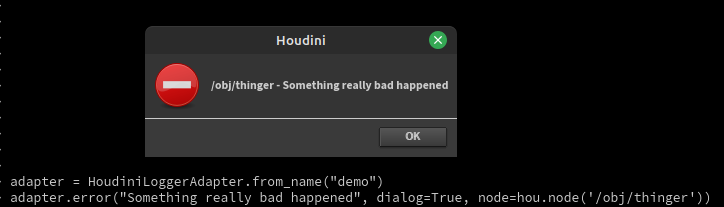
By utilizing the dialog kwarg we can cause the log message to also be emitted as a Houdini dialog via
hou.ui.displayMessage().
>>> adapter = HoudiniLoggerAdapter.from_name("demo")
>>> adapter.error("Something really bad happened", dialog=True, node=hou.node('/obj/thinger'))
/obj/thinger - Something really bad happened
Custom Dialog Titles
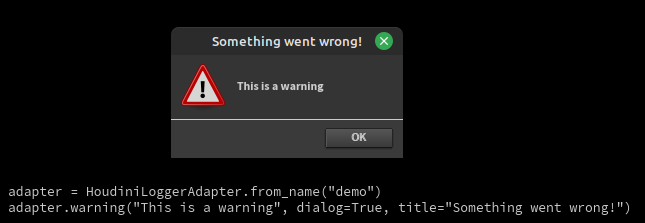
A title kwarg is also respected when dialog=True such that the generated message popup will use the supplied title instead of the default.
>>> adapter = HoudiniLoggerAdapter.from_name("demo")
>>> adapter.warning("This is a warning", dialog=True, title="Something went wrong!")
This is a warning
Status Bar Messages
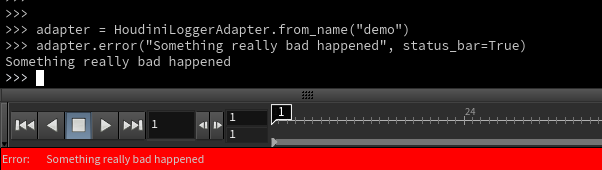
By utilizing the status_bar kwarg we can cause the log message to also be emitted as a Houdini status bar message
via hou.ui.setStatusMessage().
>>> adapter = HoudiniLoggerAdapter.from_name("demo")
>>> adapter.error("Something really bad happened", status_bar=True)
Something really bad happened
Standard log call arg support
The adapter also supports any expected extra args being passed to log calls, such as using format strings:
>>> adapter = HoudiniLoggerAdapter.from_name("demo")
>>> adapter.warning("This is a %s", "test", node=hou.node('/obj/geo1'))
/obj/geo1 - This is a test